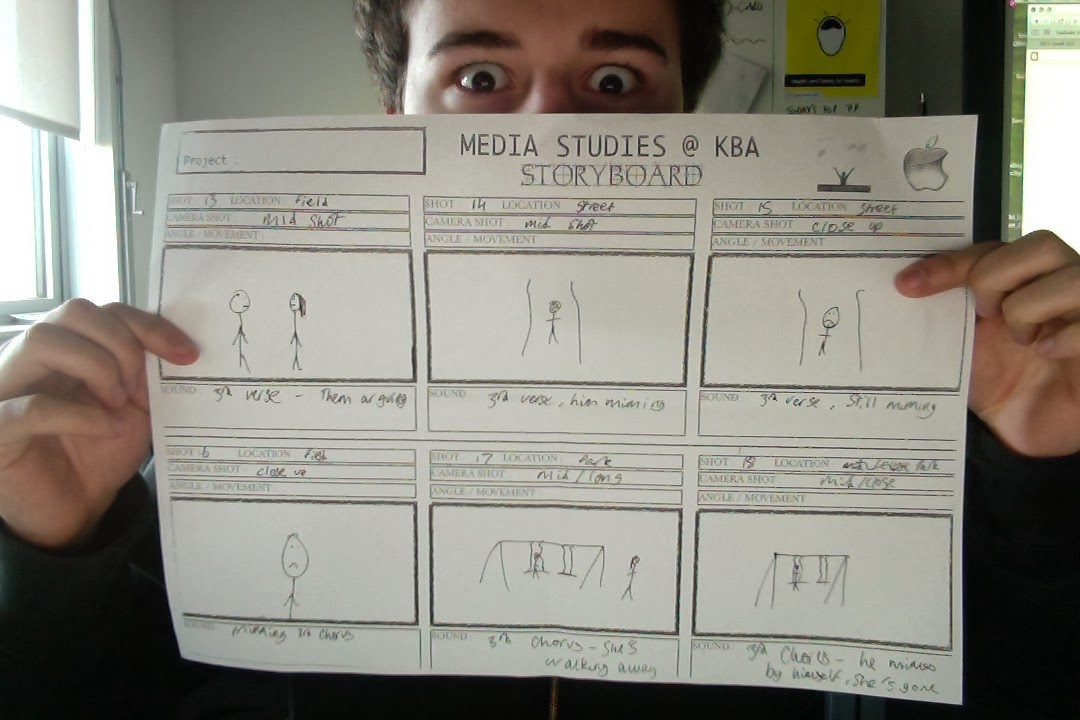
Planning; Storyboard

As a class we were asked to create a storyboard for our music video. This will show the following things;

  • It will show what number the shot is. So this means that it will show the shot order, and whether it is the first or last shot for example.
  • It will show the location of the shot, for example a park.
  • It will show what shot it will be, for example a mid shot.
  • It will show the camera angle or the camera movement, so for example tracking.
  • It will include drawing of what will be happening in the shot, drawn by myself.
  • Finally, it will say what will be happening in the shot, so for example saying that the actor is miming the song.
Below are images of my storyboard.


Planning; Costume

I have 2 characters in total. One is a male character and the other is female. Costume is very important as everything has to fit with the artist's genre, which in my case is soul/r&b.

Male;
The male actor will be wearing jeans, coat and trainers throughout the majority of my music video. I will be going for a casual look as I believe it ties in with the music genre. I wouldn't go for a tracksuit because that may be interpreted to fit with the rap sort of genre, so it would be important to get this right. At some points I may have indoor scene, so they would lose the trainers and a coat and would have socks and a casual t-shirt on. The male is the main character and will be portrayed as the artist, it is very important that his costume is sorted.


Female;
The female actor will be wearing around about the same thing. They will also be going for the casual look of jeans, coat and trainers. Similarly to the male character, when it goes to an indoor scene she will lose the trainers and coat for socks and a casual t-shirt. As the female isn't the main character and isn't the artist, her costume isn't as important.

Planning; Location

My plot is to be a relationship breakup, so I plan to use different locations that I can show the couple in and then show the male character in the same place by himself.

My first idea is a park;

KLV park- There is a park in Kettering Leisure Village that I feel will suit. There is a swing and a slide, which I will show them using looking happy, and then show him at looking sad. I feel this location will suit because a park is usually a happy place for people, which I feel will work well with my plot.
(PICTURE)

Another idea is the field near this park, KLV;

Next to the park is a big field. I can show them leaving the park and just walking over to the park. I feel that this is a good idea because it can also show them looking happy here, and then show him looking sad.
(PICTURE)

A third idea I had was inside a house;

I think that this is a good idea because it would show them inside, maybe watching TV, happy, laughing etc, and then he would be able to sit there by himself.
(PICTURE)

Planning; Using Adobe Premiere Pro


Above I have attached the original version of Macklemore's song Wings. The post below shows a short edit of this song that I created.

Planning; Music video editing with Adobe Premiere Pro


Above is the first 30 seconds of my edit of Macklemore's song Wings.

As I have done in my edit, I have now developed my skills with Adobe Premiere Pro enough to be able to lip sync the artist with the lyrics. It was difficult to do so because I didn't know the song before doing this task, so I didn't know where the lip sync clips go and I had to work this out.

Firstly, I listened to the song the whole way through to try and get to know it, and I looked through the clips to get a general idea of how I am going to put it all together. One of the ideas of this edit, was to cut to the beat of the song. It was important to do this so the video doesn't look out of place and it looks like it makes sense, and I believe I did this fairly well.

In the short clip above, there isn't any evidence of me using any effects or transitions. But, before I started putting edit together, I had a little play with these to try them out and get used to using them. I believe that these are good to use in a music video because it helps with the flow of the song, and will help massively with keeping the audience engaged because it will help you to edit it together. It is important that you don't use the same effect or transition over and over again, because it may get boring for the audience as they have to see the same thing over and over and I will take this into consideration when I do my video, as I want my video to be interesting and not boring.

I believe that doing this practice edit has been very useful as I have developed my skills using the software, and I now know how to do many things with it. I have got good at lip syncing, which will be very important for a music video. I believe my skills have improved a lot, which is good for when I come round to doing my music video.

Planning; Learning to edit with Adobe Premiere Pro


Above is my first practice using Adobe premiere pro. I have put together an edit of one person walking into a room and exchanging a few lines of dialogue with another person.


In order to start using premier pro, I needed to either open a project or start a new project. As this is my first time using premier pro, I will need to start a new project.

In order to edit, I needed to have some footage to actually edit. So I imported the files that I wanted and then I could start.

As you can see above, in the top left corner of the screen shot there is a folder. This folder contains the files that I imported in to edit. This is good because if I wanted to use a different file, all the files that I need are there so I can quickly access them.


As I edit more footage together, the bar at the bottom gets more and more full. This is good because this allows me to quickly go to a certain point of my footage, and it is easy to use.
Now that my project is completed, I exported it to Youtube. To do this, I clicked file and then export and then ensured all of the settings were correct.
After ensuring that the settings were correct, I then finalised this process by pressing the export button. I then had to wait for it to complete and then I was able to use it.

Above is a picture taken of me editing this piece together. I believe that doing this task was a success, because I have developed my skills with Adobe Premiere Pro and learnt the basics to editing. This was a good task to do because it enabled me to gain the basic editing skills, and I am now set up to learn further skills and develop them further.